mirror of
https://github.com/shadps4-emu/shadPS4.git
synced 2025-12-09 13:19:00 +00:00
 ed9ffbfb64
* actions removal

* removed qt dir

# Conflicts:
#	src/qt_gui/check_update.cpp
#	src/qt_gui/translations/ar_SA.ts
#	src/qt_gui/translations/ca_ES.ts
#	src/qt_gui/translations/da_DK.ts
#	src/qt_gui/translations/de_DE.ts
#	src/qt_gui/translations/el_GR.ts
#	src/qt_gui/translations/en_US.ts
#	src/qt_gui/translations/es_ES.ts
#	src/qt_gui/translations/fa_IR.ts
#	src/qt_gui/translations/fi_FI.ts
#	src/qt_gui/translations/fr_FR.ts
#	src/qt_gui/translations/hu_HU.ts
#	src/qt_gui/translations/id_ID.ts
#	src/qt_gui/translations/it_IT.ts
#	src/qt_gui/translations/ja_JP.ts
#	src/qt_gui/translations/ko_KR.ts
#	src/qt_gui/translations/lt_LT.ts
#	src/qt_gui/translations/nb_NO.ts
#	src/qt_gui/translations/nl_NL.ts
#	src/qt_gui/translations/pl_PL.ts
#	src/qt_gui/translations/pt_BR.ts
#	src/qt_gui/translations/pt_PT.ts
#	src/qt_gui/translations/ro_RO.ts
#	src/qt_gui/translations/ru_RU.ts
#	src/qt_gui/translations/sl_SI.ts
#	src/qt_gui/translations/sq_AL.ts
#	src/qt_gui/translations/sr_CS.ts
#	src/qt_gui/translations/sv_SE.ts
#	src/qt_gui/translations/tr_TR.ts
#	src/qt_gui/translations/uk_UA.ts
#	src/qt_gui/translations/ur_PK.ts
#	src/qt_gui/translations/vi_VN.ts
#	src/qt_gui/translations/zh_CN.ts
#	src/qt_gui/translations/zh_TW.ts

* removed CMakePresets for qt builds

* clear cmakelists from qt

* sync config file with qtlauncher

* fixing review stuff

* Remove Qt code from memory patcher and add non-Qt fallback for automatic loading of patches
The second feature is disabled if IPC is present, to avoid conflicts with it.

* Add json submodule

* More Qt removal

* Documentation update

* fix build

* fix REUSE?

* removed qrc file

* fix clang

* Simplify Qt installation instructions for macOS

Removed instructions for installing x86_64 Qt on ARM and x86_64 Macs.

* Remove Qt installation instructions from guide

Removed instructions for downloading and configuring Qt.

---------

Co-authored-by: kalaposfos13 <153381648+kalaposfos13@users.noreply.github.com>
144 lines
6.2 KiB
Markdown
144 lines
6.2 KiB
Markdown
<!--
|
|
SPDX-FileCopyrightText: 2024 shadPS4 Emulator Project
|
|
SPDX-License-Identifier: GPL-2.0-or-later
|
|
-->
|
|
|
|
## Build shadPS4 for Linux
|
|
|
|
First and foremost, Clang 18 is the **recommended compiler** as it is used for official builds and CI. If you build with GCC, you might encounter issues — please report any you find. Additionally, if you choose to use GCC, please build shadPS4 with Clang at least once before creating an `[APP BUG]` issue or submitting a pull request.
|
|
|
|
## Preparatory steps
|
|
|
|
### Installing dependencies
|
|
|
|
#### Debian & Ubuntu
|
|
|
|
```bash
|
|
sudo apt install build-essential clang git cmake libasound2-dev \
|
|
libpulse-dev libopenal-dev libssl-dev zlib1g-dev libedit-dev \
|
|
libudev-dev libevdev-dev libsdl2-dev libjack-dev libsndio-dev \
|
|
libvulkan-dev vulkan-validationlayers libpng-dev
|
|
```
|
|
|
|
#### Fedora
|
|
|
|
```bash
|
|
sudo dnf install clang git cmake libatomic alsa-lib-devel \
|
|
pipewire-jack-audio-connection-kit-devel openal-soft-devel \
|
|
openssl-devel libevdev-devel libudev-devel libXext-devel \
|
|
vulkan-devel vulkan-validation-layers libpng-devel libuuid-devel
|
|
```
|
|
|
|
#### Arch Linux
|
|
|
|
```bash
|
|
sudo pacman -S base-devel clang git cmake sndio jack2 openal \
|
|
sdl2 vulkan-validation-layers libpng
|
|
```
|
|
|
|
**Note**: The `shadps4-git` AUR package is not maintained by any of the developers, and it uses the default compiler, which is often set to GCC. Use at your own discretion.
|
|
|
|
#### OpenSUSE
|
|
|
|
```bash
|
|
sudo zypper install clang git cmake libasound2 libpulse-devel \
|
|
libsndio7 libjack-devel openal-soft-devel libopenssl-devel \
|
|
zlib-devel libedit-devel systemd-devel libevdev-devel \
|
|
vulkan-devel vulkan-validationlayers libpng-devel
|
|
```
|
|
|
|
#### NixOS
|
|
|
|
```bash
|
|
nix-shell shell.nix
|
|
```
|
|
|
|
#### Other Linux distributions
|
|
|
|
You can try one of two methods:
|
|
|
|
- Search the packages by name and install them with your package manager, or
|
|
- Install [distrobox](https://distrobox.it/), create a container using any of the distributions cited above as a base, for Arch Linux you'd do:
|
|
|
|
```bash
|
|
distrobox create --name archlinux --init --image archlinux:latest
|
|
```
|
|
|
|
and install the dependencies on that container as cited above.
|
|
This option is **highly recommended** for distributions with immutable/atomic filesystems (example: Fedora Kinoite, SteamOS).
|
|
|
|
### Cloning
|
|
The project uses submodules to manage dependencies, and they need to be initialized before you can build the project. To achieve this, make sure you've cloned the repository with the --recursive flag
|
|
|
|
```bash
|
|
git clone --recursive https://github.com/shadps4-emu/shadPS4.git
|
|
cd shadPS4
|
|
```
|
|
|
|
## Building
|
|
|
|
There are 3 options you can choose from. Option 1 is **highly recommended**.
|
|
|
|
#### Option 1: Terminal-only
|
|
|
|
1. Generate the build directory in the shadPS4 directory.
|
|
|
|
```bash
|
|
cmake -S . -B build/ -DCMAKE_C_COMPILER=clang -DCMAKE_CXX_COMPILER=clang++
|
|
```
|
|
|
|
To change the build type (for debugging), add `-DCMAKE_BUILD_TYPE=Debug`.
|
|
|
|
1. Use CMake to build the project:
|
|
|
|
```bash
|
|
cmake --build ./build --parallel$(nproc)
|
|
```
|
|
|
|
If your computer freezes during this step, this could be caused by excessive system resource usage. In that case, remove `--parallel$(nproc)`.
|
|
|
|
Now run the emulator to get the list of options:
|
|
|
|
```bash
|
|
./build/shadps4
|
|
```
|
|
|
|
You can also specify the Game ID as an argument for which game to boot, as long as the folder containing the games is specified in config.toml (example: Bloodborne (US) is CUSA00900).
|
|
#### Option 2: Configuring with cmake-gui
|
|
|
|
`cmake-gui` should be installed by default alongside `cmake`, if not search for the package in your package manager and install it.
|
|
|
|
Open `cmake-gui` and specify the source code and build directories. If you cloned the source code to your Home directory, it would be `/home/user/shadPS4` and `/home/user/shadPS4/build`.
|
|
|
|
Click on Configure, select "Unix Makefiles", select "Specify native compilers", click Next and choose `clang` and `clang++` as the C and CXX compilers. Usually they are located in `/bin/clang` and `/bin/clang++`. Click on Finish and let it configure the project.
|
|
|
|
Now every option should be displayed in red. Change anything you want, then click on Generate to make the changes permanent, then open a terminal window and do step 2 of Option 1.
|
|
|
|
#### Option 3: Visual Studio Code
|
|
|
|
This option is pretty convoluted and should only be used if you have VSCode as your default IDE, or just prefer building and debugging projects through it. This also assumes that you're using an Arch Linux environment, as the naming for some options might differ from other distros.
|
|
|
|
[Download Visual Studio Code for your platform](https://code.visualstudio.com/download), or use [Code - OSS](https://github.com/microsoft/vscode) if you'd like. Code - OSS is available on most Linux distributions' package repositories (on Arch Linux it is simply named `code`).
|
|
|
|
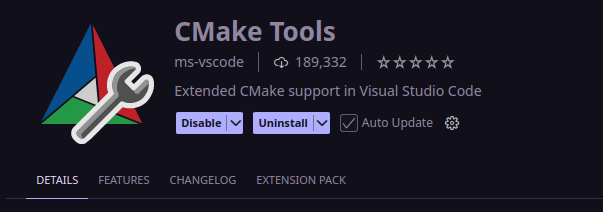
Once set up, go to Extensions and install "CMake Tools":
|
|
|
|
|
|
|
|
You can also install other CMake and Clang related extensions if you'd like, but this one is what enables you to configure and build CMake projects directly within VSCode.
|
|
|
|
Go to Settings, filter by `@ext:ms-vscode.cmake-tools configure` and disable this option:
|
|
|
|

|
|
|
|
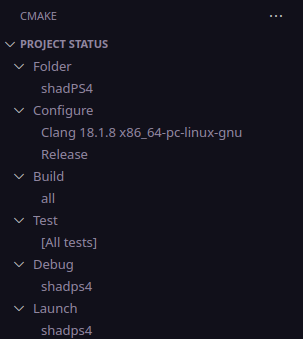
On the CMake tab, change the options as you wish, but make sure that it looks similar to or exactly like this:
|
|
|
|
|
|
|
|
When hovering over Project Status > Configure, there should be an icon titled "Configure". Click on it and let it configure the project, then do the same for Project Status > Build.
|
|
|
|
If you want to debug it, change the build type under Project Status > Configure to Debug (it should be the default) and compile it, then click on the icon in Project Status > Debug. If you simply want to launch the shadPS4 executable from within VSCode, click on the icon in Project Status > Launch.
|
|
|
|
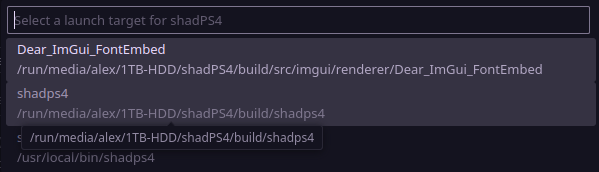
Don't forget to change the launch target for both options to the shadPS4 executable inside shadPS4/build:
|
|
|
|
|